
PixPin(截图工具) v2.3.1.0 - 果核剥壳

作者在平时的工作流中经常使用图片相关的工具,截图贴图:Snipaste; Ocr:PearOCR; 长截图截动图:QQ 截图; 不过经常切换软件还是比较麻烦,于是写了一个新的截图工具,并且加上 PearOCR 的离线识别引擎,把日常用到的相关功能都集合在一起,PixPin 诞生了。

软件特色

截图
自动识别窗口元素,可使用滚轮切换父/子元素
附带各种标注工具

贴图
把剪贴板的图片/文字贴到其他窗口最上层,方便参考查阅
自动识别图片上的文字,离线识别引擎,无数据上传
提供标注工具方便二次标注

截长图
智能图像识别算法自动捕捉滚动的图片

截动图
把操作过程保存为 Gif/Png/Webp 动图
提供标注过程,可以在录制过程中方便地标注

软件截图
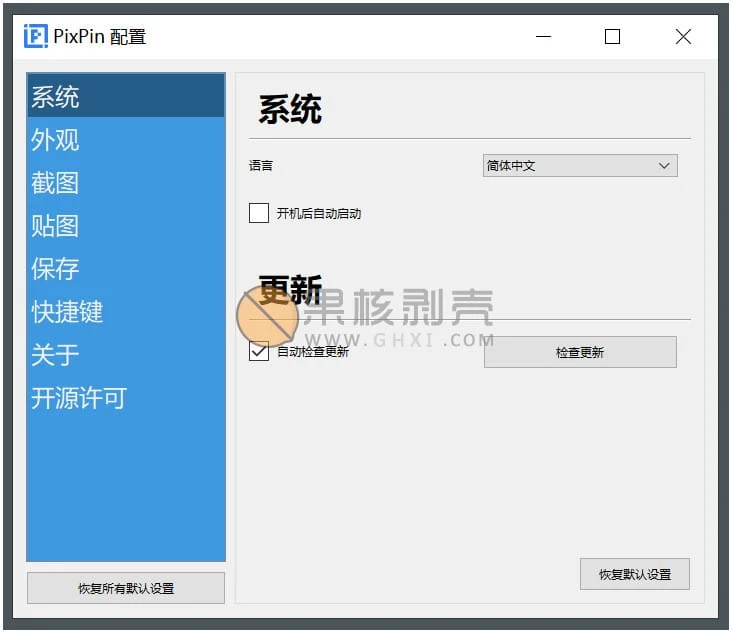
PixPin(截图工具) v2.3.1.0

更新日志

【功能】图像贴图增加二维码识别功能,右键菜单「识别」-「识别二维码」
【设置】「保存」-「自动保存」增加清理老文件的选项,可以设置自动清理多少天前的文件
【修复】「记住上次选择的标注工具」选项不生效
【修复】某些场景下录屏导出后播放时长异常
【修复】某些场景下录屏导出时会导致程序崩溃

下载链接

如无法启动软件,可尝试右键使用管理员权限打开

https://pan.quark.cn/s/c8edd8b57a9b

https://pan.xunlei.com/s/VOL3W-jPfdL-GF2lYui3E5MNA1?pwd=vywc#

已高速(如有密码:3519)http://ct.ghpym.com/d/7369060-58713733-609614

PixPin(截图工具) v2.3.1.0VIP高速直链
果核剥壳独家直链,无需网盘直接下载,省时省力
普通用户每天也提供免费下载次数
隐藏内容,VIP可见

如果您喜欢本站,点击这儿不花一分钱捐赠本站

这些信息可能会帮助到你: 下载帮助 | 报毒说明 | 进站必看

修改版本安卓软件,加群提示为修改者自留,非本站信息,注意鉴别

(106)
上一篇 2025年12月8日 下午4:51
下一篇 2025年12月8日 下午5:08

相关推荐

回复 fish

评论问题之前,点击我,能帮你解决大部分问题

您的电子邮箱地址不会被公开。 必填项已用*标注

评论列表(221条)

  • Eastwind
    Eastwind 2025年11月18日 下午3:30
    Google Chrome 130.0.0.0 Google Chrome 130.0.0.0 Windows 10 x64 Edition Windows 10 x64 Edition

    试一下啊,看看我现在是什么浏览器大笑

  • Eastwind
    Eastwind 2025年11月18日 下午3:08
    Google Chrome 119.0.0.0 Google Chrome 119.0.0.0 Windows 10 x64 Edition Windows 10 x64 Edition

    22分钟微笑

  • 剥果壳核
    剥果壳核 2025年11月12日 上午8:47
    Microsoft Edge 142.0.0.0 Microsoft Edge 142.0.0.0 Windows 11 x64 Edition Windows 11 x64 Edition

    好奇怪啊,官网只有2.1.8的更新

  • 剥果壳核
    剥果壳核 2025年11月12日 上午8:39
    Microsoft Edge 142.0.0.0 Microsoft Edge 142.0.0.0 Windows 11 x64 Edition Windows 11 x64 Edition

    这个软件什么时候开始收费了?

  • 859037821
    859037821 2025年11月11日 上午11:49
    Microsoft Edge 142.0.0.0 Microsoft Edge 142.0.0.0 Windows 11 x64 Edition Windows 11 x64 Edition

    果核大大,翻译怎么用不了

  • 123
    123 2025年11月5日 下午2:53
    Microsoft Edge 141.0.0.0 Microsoft Edge 141.0.0.0 Windows 10 x64 Edition Windows 10 x64 Edition

    滚轮选区真好用

  • as
    as 2025年10月24日 下午2:04
    Microsoft Edge 141.0.0.0 Microsoft Edge 141.0.0.0 Windows 10 x64 Edition Windows 10 x64 Edition

    建议标题区分正式版 还是测试版,

  • fish
    fish 2025年10月18日 下午6:34
    Microsoft Edge 141.0.0.0 Microsoft Edge 141.0.0.0 Windows 11 x64 Edition Windows 11 x64 Edition

    这个版本似乎有问题,不管是按快捷键还是点击托盘图标截图,都会自动退出
    系统版本win11 25H2,26200.6899

    • Aya
      Aya 2025年10月20日 上午7:47
      Google Chrome 134.0.0.0 Google Chrome 134.0.0.0 Windows 11 x64 Edition Windows 11 x64 Edition

      重新安装看看,我也是软件和系统都和你相同版本,一切正常

  • 橘子
    橘子 2025年10月18日 下午12:56
    Microsoft Edge 141.0.0.0 Microsoft Edge 141.0.0.0 Windows 11 x64 Edition Windows 11 x64 Edition

    为什么官网才2.0.0.3

    • H.
      H. 2025年10月20日 下午2:45
      Microsoft Edge 141.0.0.0 Microsoft Edge 141.0.0.0 Windows 11 x64 Edition Windows 11 x64 Edition

      官网有分测试版跟正式版 正式版是2.0.0.3 测试版已经2.1.6.6了

  • Dustin.Hayes.Hong
    Dustin.Hayes.Hong 2025年8月16日 下午6:17
    Google Chrome 139.0.0.0 Google Chrome 139.0.0.0 Windows 10 x64 Edition Windows 10 x64 Edition

    不知道为什么开机无法自启动

  • 143723
    143723 2025年7月25日 下午12:33
    Microsoft Edge 125.0.0.0 Microsoft Edge 125.0.0.0 Mac OS X  10.15.7 Mac OS X 10.15.7

    MACOS 10.15版本闪退问题解决:参考这个https://www.jianshu.com/p/46331a299576

    • LEONUS
      LEONUS 2025年8月7日 下午1:58
      Google Chrome 130.0.0.0 Google Chrome 130.0.0.0 Windows 11 x64 Edition Windows 11 x64 Edition

      感谢,终于有人能为 老版本mac 发声啦,非常感谢赞,希望有用啊!

    • LEONUS
      LEONUS 2025年8月9日 下午4:08
      Google Chrome 130.0.0.0 Google Chrome 130.0.0.0 Mac OS X  10.15.7 Mac OS X 10.15.7

      有用,已解决问题,非常感谢赞赞赞

    • ONE
      ONE 2025年9月19日 下午2:14
      Google Chrome 140.0.0.0 Google Chrome 140.0.0.0 Windows 11 x64 Edition Windows 11 x64 Edition

      请问,怎样在macos运行呢

    • ONE
      ONE 2025年9月15日 下午2:59
      Google Chrome 139.0.0.0 Google Chrome 139.0.0.0 Windows 11 x64 Edition Windows 11 x64 Edition

      请问,哪里有macos的pixpin绿色版?

  • weaver
    weaver 2025年6月25日 上午10:49
    Google Chrome 138.0.0.0 Google Chrome 138.0.0.0 Windows 10 x64 Edition Windows 10 x64 Edition

    用来用去还是我的verycapture好用

  • 高
    2025年6月25日 上午9:09
    Firefox 139.0 Firefox 139.0 Windows 10 x64 Edition Windows 10 x64 Edition

    很特別的Pin功能(Ctrl + 2),可以將截圖貼在螢幕上(可以移動貼圖位置),甚至可以辨識圖片中的文字(雖然不是100%辨識正確)

  • Zoony.Xu
    Zoony.Xu 2025年6月24日 下午4:29
    Microsoft Edge 137.0.0.0 Microsoft Edge 137.0.0.0 Windows 11 x64 Edition Windows 11 x64 Edition

    与SNIPASTE相比,有时候流畅度不够,会有卡死现象,回退截图缺少F5刷新当前画面功能,优势是有长截图和OCR文字识别功能

  • 什么都想知道先生
    八角先生 2025年6月13日 上午9:44
    Google Chrome 136.0.0.0 Google Chrome 136.0.0.0 Windows 10 x64 Edition Windows 10 x64 Edition

    好用,会员还是有点贵,更希望作者能根据授权设备数量出个梯度价格

  • 立刻
    立刻 2025年5月25日 下午2:34
    Opera 4.0 Opera 4.0 Android 8.0 Android 8.0

    是学习版吗?

  • 198922
    198922 2025年5月7日 下午8:43
    Microsoft Edge 136.0.0.0 Microsoft Edge 136.0.0.0 Windows 11 x64 Edition Windows 11 x64 Edition

    没有全屏选项a啊,截取全屏还要手动拉

  • xtfncba
    xtfncba 2025年3月26日 上午9:02
    Google Chrome 101.0.4951.64 Google Chrome 101.0.4951.64 Windows 11 x64 Edition Windows 11 x64 Edition

    vip太贵了。。

  • aaa2k
    年费VIPaaa2k 2025年3月25日 下午5:30
    Firefox 126.1 Firefox 126.1 Windows 10 x64 Edition Windows 10 x64 Edition

    太厉害了,比我买的更新还快

  • 182919
    182919 2025年3月12日 下午4:32
    Google Chrome 118.0.0.0 Google Chrome 118.0.0.0 Windows 11 x64 Edition Windows 11 x64 Edition

    官网上pixpin最新版本还是 1.9.11.9,果核的版本已经领先两次了。是不是内测 beta版本?

    • 拒绝任何萝卜
      拒绝任何萝卜 2025年3月13日 下午3:23
      Google Chrome 118.0.0.0 Google Chrome 118.0.0.0 Windows 11 x64 Edition Windows 11 x64 Edition

      是内测版,正式版连续点击检查更新即可看到