
沙盘Sandboxie v5.72.3 官方版 / SandboxiePlus v1.17.3 中文版 - 果核剥壳

沙盘Sandboxie允许你在沙盘环境中运行浏览器或其他程序,因此运行所产生的变化可以随后删除。可用来消除上网、运行程序的痕迹,也可用来还原收藏夹、主页、注册表等。即使在沙盘进程中下载的文件,也会随着沙盘的清空而删除。沙盘Sandboxie在系统托盘中运行,如果想启动一个沙盘进程,请通过托盘图标(而不要用原方式)启动浏览器或相应程序。

修改说明

官方已经免费,版本不再收费,变成社区版,由社区维护

沙盘Sandboxie v5.72.3 官方版 / SandboxiePlus v1.17.3 中文版

另外分支出来一个新版本,叫做SandboxiePlus,添加了新功能,例如框快照,以及更好的日志记录/跟踪,并提供了一个新的基于Qt的UI来利用该功能。汉化来自卡饭网友。
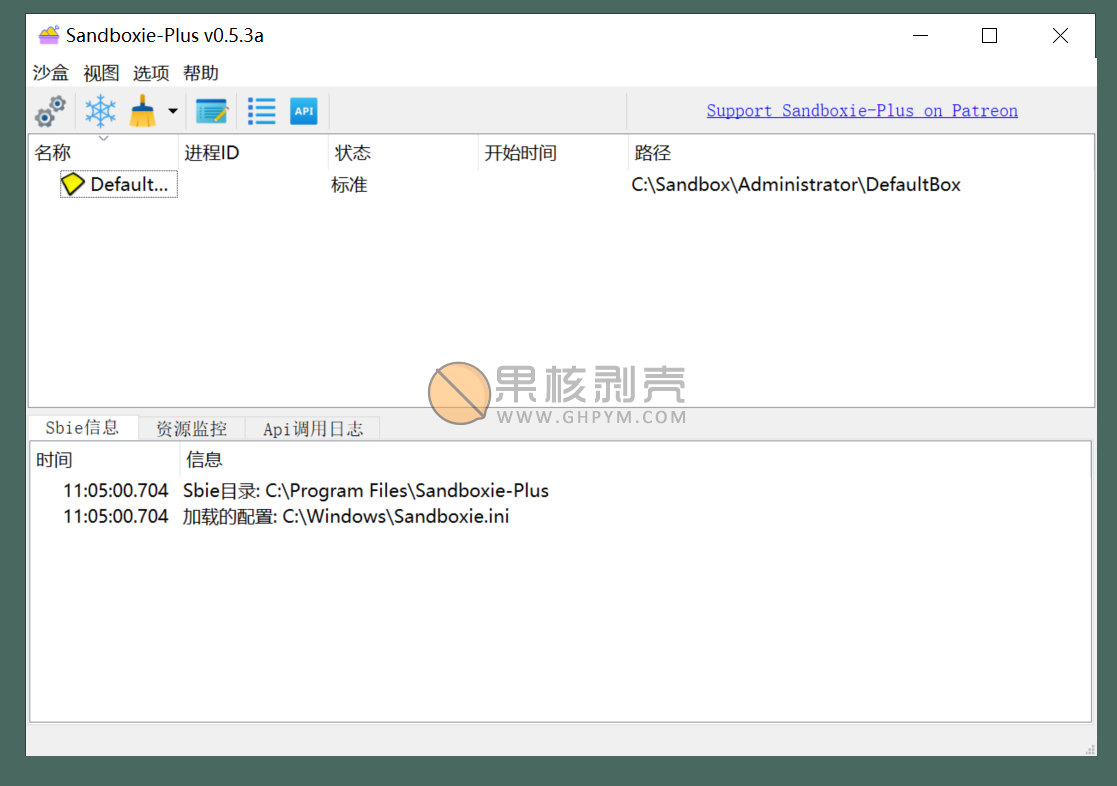
沙盘Sandboxie v5.72.3 官方版 / SandboxiePlus v1.17.3 中文版

更新日志

添加
添加了可配置的窗口位置设置,以控制哪些监视器主窗口、非主窗口、文件恢复窗口和通知窗口打开,包括可选择的回退模式。#4536 #5238
全局设置界面配置窗口选项
添加“标签只”边框模式选项(onlbl,ttllbl,alllbl),隐藏彩色边框,只显示沙箱名称(或别名)标签#5239
为Windows 11添加了Windows 10解决方法模板#5183 #5203(感谢xsmolasses)
添加了新的托盘自定义选项(全局设置>外壳集成>系统托盘):#5254
“在托盘上下文菜单中显示图标”(Options/TrayIcons)-控制是否在托盘菜单中显示自定义沙箱图标。
“在托盘中显示盒子别名而不是盒子名称”(Options/TrayUseAlias)-在紧凑和常规托盘菜单中显示配置的别名/显示名称。
“在任务栏列表中将沙盒状态显示为工具提示”(Options/TrayStatusTip)现在支持三态行为:未选中=从不,部分=按住Ctrl或Shift(默认)时,选中=始终。
“Show overlay icons for boxes in tray list”(Options/TrayOverlayIcons)-在紧凑型小部件和常规上下文菜单中的托盘图标上显示与主沙箱列表中使用的相同的框状态覆盖(无强制、磁盘映像已安装/已卸载、RAM磁盘、自动删除)。
添加了边界捕获排除,HideBordersFromCapture
使边框和标签不出现在屏幕截图和屏幕录制中;默认为CoverBoxedWindows
添加了边框标签宽度和边框裁剪选项
通过BorderColor标签宽度和BorderExcludeTaskbar可配置
添加UseFakeShellDispatch选择提供合成IShellDispatch回退(可能会修复一些WebView2问题)
可通过UseFakeShellDispatch=process,n按进程禁用
添加Template_OnScreenKeyboard(Windows 11)以修复与沙箱程序一起使用时屏幕键盘冻结
改变
通过在沙箱模型中缓存自定义BoxIcon分辨率,而不是在刷新时重新加载图标资源,减少了GUI CPU的持续使用
在SandMan主计时器中将互联网连接检查节流为每60秒一次,并缓存结果
更新程序仅在设备具有互联网连接时运行,消除了浪费的网络尝试并减少了重复的HKLM\\SYSTEM\\Setup\\SystemSetupInProgress注册表检查
更改了复制沙箱行为,因此活动框别名在复制时也会收到“Copy”后缀
将托盘沙盒/组排序更改为镜像沙盒列表模式(手动/升序/降序),包括组排序
通过仅在缓存未命中时解析DblClickAction目标路径(GetCommandFile)并缓存运行/开始菜单项的LoadWindowsIcon(path,index)结果,改进了托盘/沙箱图标缓存,减少了打开菜单时重复提取系统图标的情况
改进的边界渲染
固定
修复了在将非默认进程网络模式设置为非默认的情况下,在离开网络选项时出现“某些更改尚未保存”的错误提示
修复了不保留原始长方体组指定的重复长方体
修复双击组的空路径/命令行崩溃#5253
固定紧凑托盘框列表剪切长沙箱名称;宽度现在是精确测量每个项目使用字体度量和规模正确地在任何DPI#5254
修复了在SbieDll中打开相对键的WOW 64注册表视图继承,在KEY_WOW64_32KEY/KEY_WOW64_64KEY/NtOpenKey中保留父项NtCreateKey语义#5171#5244
修复了ScanStartMenu中的句柄泄漏:IShellLinkW和IPersistFile COM接口从未在ResolveShortcut中发布,永久保留了扫描的每个.lnk快捷方式的句柄(文件,注册表,图标);将原始指针替换为CComPtr,以确保所有退出路径上的Release()
修复了ClosedClsid和ClosedRT设置的解析逻辑#5263
已修复安全问题ID-32:编辑密码哈希熵丢失,新密码将采用SHA 256和base64编码
注意:修复只在设置密码时生效,现有密码仍然很弱
修复了可被沙盒进程CVE-2026-32603利用的本地拒绝服务(DoS)漏洞(由sammy 12342报告)
通过INI CRLF注入修复了Sandboxie-Plus EditAdminOnly旁路(由sammy 12342报告)
修复了GetRawInputDeviceInfoSlave的问题(由sammy12342报告)
修复了RunSbieCtrl的问题(由Yanchon918s报告)
修复了ProcessServer处理程序中的名称验证(由Yanchon918s报告)
NamedPipeServer中的固定参数验证(由Yanchon918s报告)
修复了更新程序的文件完整性问题(由sammy12342报告)

下载地址

Sandboxie plus汉化方法:安装完成后,在菜单Options->第一个下拉选择简体中文,重启即可

1.16.2/5.71.2版本不再提供32位

https://github.com/sandboxie-plus/Sandboxie/releases

https://pan.xunlei.com/s/VOLCGVTWa-9GcY7WsO1B5rImA1?pwd=fi8s#

https://pan.quark.cn/s/89e91be2eb4b

已高速(如有密码:3519)http://ct.ghpym.com/d/7369060-41280383-6710a9

沙盘Sandboxie v5.72.3 官方版 / SandboxiePlus v1.17.3 中文版VIP高速直链
果核剥壳独家直链,无需网盘直接下载,省时省力
普通用户每天也提供免费下载次数
隐藏内容,VIP可见

如果您喜欢本站,点击这儿不花一分钱捐赠本站

这些信息可能会帮助到你: 下载帮助 | 报毒说明 | 进站必看

修改版本安卓软件,加群提示为修改者自留,非本站信息,注意鉴别

(89)
上一篇 4天前
下一篇 4天前

相关推荐

发表回复

评论问题之前,点击我,能帮你解决大部分问题

您的电子邮箱地址不会被公开。 必填项已用*标注

评论列表(112条)

  • yuhao2348632
    yuhao2348632 2020年12月26日 下午9:48
    Google Chrome 86.0.4240.198 Google Chrome 86.0.4240.198 Windows 7 x64 Edition Windows 7 x64 Edition

    sandboxie plus个人汉化(内附使用说明)
    链接: 链接: https://pan.baidu.com/s/1JPRprwCLW4f7hxAsTwYpSQ 提取码: 3v51
    备用:https://cloud.189.cn/t/yeYfEnmuU7Fr(访问码:4cdg)

    • 小浪宝
      小浪宝 2020年12月26日 下午11:26
      Microsoft Edge 87.0.664.66 Microsoft Edge 87.0.664.66 Windows 10 x64 Edition Windows 10 x64 Edition

      感谢大佬!

    • yuhao2348632
      yuhao2348632 2021年1月3日 上午7:12
      Google Chrome 86.0.4240.198 Google Chrome 86.0.4240.198 Windows 7 x64 Edition Windows 7 x64 Edition

      已更新0.53,功能和字符串有几处不一样,最好用最新的,而且0.53不用打语言补丁

  • hozt81413
    hozt81413 2020年12月8日 下午7:20
    Microsoft Edge 87.0.664.57 Microsoft Edge 87.0.664.57 Windows 10 x64 Edition Windows 10 x64 Edition

    如何制成绿色版?

  • wusiu
    wusiu 2020年11月23日 下午8:36
    Microsoft Edge 86.0.622.58 Microsoft Edge 86.0.622.58 Windows 10 x64 Edition Windows 10 x64 Edition

    腾讯直接拦截

  • 呵呵
    呵呵 2020年11月4日 下午11:34
    Firefox 81.0 Firefox 81.0 Windows 10 x64 Edition Windows 10 x64 Edition

    大学那会儿跟人拼团,188入手的终身授权,没想到免费了....

  • lingling
    lingling 2020年10月13日 上午9:20
    Google Chrome 74.0.3729.169 Google Chrome 74.0.3729.169 Windows 10 x64 Edition Windows 10 x64 Edition

    这个版本是从哪里来的,官方最后一版应该是5.33.3.0

    • lingling
      lingling 2020年10月13日 上午9:21
      Google Chrome 74.0.3729.169 Google Chrome 74.0.3729.169 Windows 10 x64 Edition Windows 10 x64 Edition

      GitHub上也只到5.40

    • SAMPHQ
      SAMPHQ 2020年11月19日 下午11:51
      Firefox 82.0 Firefox 82.0 Windows 10 x64 Edition Windows 10 x64 Edition

      一位叫DavidXanatos 接手维护,人家在GitHub上有发布的,github.com/sandboxie-plus/Sandboxie/releases/tag/v0.4.5

    • 小浪宝
      小浪宝 2020年11月20日 下午7:24
      Microsoft Edge 86.0.622.69 Microsoft Edge 86.0.622.69 Windows 10 x64 Edition Windows 10 x64 Edition

      感谢!

  • 。。
    。。 2020年10月3日 上午8:56
    Google Chrome 78.0.3904.108 Google Chrome 78.0.3904.108 Windows 10 x64 Edition Windows 10 x64 Edition

    360极速浏览器没法在sandbox运行,每次浏览器都会崩溃退出

  • heavensp
    heavensp 2020年7月10日 上午12:02
    Microsoft Edge 83.0.478.61 Microsoft Edge 83.0.478.61 Windows 10 x64 Edition Windows 10 x64 Edition

    请教大佬为何杀毒软件报称sbiedrv.sys是木马?

    • ?
      2020年7月10日 上午9:46
      Microsoft Edge 83.0.478.61 Microsoft Edge 83.0.478.61 Windows 7 x64 Edition Windows 7 x64 Edition

      正常的,误报

  • starsW
    starsW 2020年7月7日 下午10:06
    Google Chrome 80.0.3987.163 Google Chrome 80.0.3987.163 Windows 10 x64 Edition Windows 10 x64 Edition

    建果核搞个直链,加载有点慢

  • 年少轻狂
    NsQk 2020年7月7日 下午7:00
    Google Chrome 83.0.4103.116 Google Chrome 83.0.4103.116 Windows 7 x64 Edition Windows 7 x64 Edition

    建果核搞个直链,加载有点慢

    • 年少轻狂
      NsQk 2020年7月7日 下午7:05
      Google Chrome 83.0.4103.116 Google Chrome 83.0.4103.116 Windows 7 x64 Edition Windows 7 x64 Edition

      建议果核搞个直链,加载有点慢

    • mingkang
      k_Ray 2020年7月7日 下午7:56
      Firefox 76.0 Firefox 76.0 Windows 10 x64 Edition Windows 10 x64 Edition

      github相关的链接我都是一律走代理的 ?

    • lv1c
      lv1c 2020年7月21日 下午1:03
      Google Chrome 84.0.4147.89 Google Chrome 84.0.4147.89 Windows 10 x64 Edition Windows 10 x64 Edition

      迅雷p2p也可以……

  • 废柴师兄
    废柴师兄 2020年7月6日 下午8:03
    Google Chrome 80.0.3987.163 Google Chrome 80.0.3987.163 Windows 10 x64 Edition Windows 10 x64 Edition

    打不开啊

  • 2451808070
    真是个好名字 2020年6月7日 下午1:11
    Google Chrome 81.0.4044.129 Google Chrome 81.0.4044.129 Windows 7 x64 Edition Windows 7 x64 Edition

    话说新生能用这种东西吗,也没有接触过

    • 2451808070
      真是个好名字 2020年6月7日 下午1:18
      Google Chrome 81.0.4044.129 Google Chrome 81.0.4044.129 Windows 7 x64 Edition Windows 7 x64 Edition

      啊呸,新手,输入法的锅

    • hongshan
      hongshan 2020年6月8日 下午1:40
      Google Chrome 80.0.3987.132 Google Chrome 80.0.3987.132 Windows 10 x64 Edition Windows 10 x64 Edition

      可以,刚开始会有教程的,只要认真看都能明白。

  • 烟花笑
    烟花笑 2020年6月7日 上午10:30
    Google Chrome 80.0.3987.162 Google Chrome 80.0.3987.162 Windows 10 x64 Edition Windows 10 x64 Edition

    在这里面运行,是不是中病毒也不怕?

    • .
      NsQk 2020年6月7日 上午11:14
      Google Chrome 83.0.4103.97 Google Chrome 83.0.4103.97 Windows 10 x64 Edition Windows 10 x64 Edition

      差不多,但虚拟机内把软件放沙盒里运行应该更安全

    • A-S
      A-S 2020年12月27日 下午11:27
      Microsoft Edge 87.0.664.66 Microsoft Edge 87.0.664.66 Windows 10 x64 Edition Windows 10 x64 Edition

      大可不必吧....我是有一个虚拟机自动还原的(每次关机自动恢复快照)这样安全性又高,兼容性也比沙盘好

    • xlxg
      xlxg 2021年1月11日 下午12:14
      UC Browser 12.9.2.1143 UC Browser 12.9.2.1143 Windows Server 2003 Windows Server 2003

      那你要是有新装的软件或者新保存的资料咋办,会被清除掉么?或者说只是保护系统、还原系统?

    • chermy
      nobody 2021年8月28日 下午5:44
      Google Chrome 86.0.4240.198 Google Chrome 86.0.4240.198 Windows 10 x64 Edition Windows 10 x64 Edition

      虚拟机沙盘都不一定安全, 各有所长, 沙盘是右键可以直接运行, 但是不支持某些系统相关的软件, 虚拟机每次要打开运行再拖进去, 而且NAT下或者SAMBA下有风险泄露, 不过虚拟机不给联网就基本安全了.

  • MrWiFi
    MrWiFi 2020年4月15日 下午8:45
    Google Chrome 80.0.3987.159 Google Chrome 80.0.3987.159 Windows 10 x64 Edition Windows 10 x64 Edition

    被360直接查杀了

    • 年少轻狂
      NsQk 2020年5月17日 下午4:21
      Google Chrome 80.0.3987.122 Google Chrome 80.0.3987.122 Windows 10 x64 Edition Windows 10 x64 Edition

      ...竟然还有人相信360
      从果核下载的完全可以忽略

  • 图尔丹
    官荷感性 2020年2月13日 下午6:18
    Google Chrome 80.0.3987.87 Google Chrome 80.0.3987.87 Windows 10 x64 Edition Windows 10 x64 Edition

    第一个正版投资都打了水漂!(lll¬ω¬)

    • wztx
      wztx 2020年2月19日 下午4:46
      Google Chrome 78.0.3904.108 Google Chrome 78.0.3904.108 Windows 10 x64 Edition Windows 10 x64 Edition

      哈哈,就是,钱也不退

    • 年少轻狂
      NsQk 2020年5月17日 下午4:22
      Google Chrome 80.0.3987.122 Google Chrome 80.0.3987.122 Windows 10 x64 Edition Windows 10 x64 Edition

      没事,就当捐了
      如果这样想也不亏

  • sli33
    sli33 2019年9月12日 下午2:03
    QQbrowser QQbrowser Android 8.1.0 Android 8.1.0

    官方宣布免费并开源了

  • shunjiu
    shunjiu 2019年5月27日 下午4:47
    Google Chrome 74.0.3729.169 Google Chrome 74.0.3729.169 Windows 10 x64 Edition Windows 10 x64 Edition

    刷新十几次都无法下载。。。

  • xiaoxiao
    xiaoxiao 2019年3月7日 下午12:45
    Google Chrome 63.0.3239.132 Google Chrome 63.0.3239.132 Windows 10 x64 Edition Windows 10 x64 Edition

    win10专业版 版本号1803 无法激活

    • applek
      年费VIP果核剥壳 2019年3月7日 下午2:00
      UC Browser 12.2.0.1000 UC Browser 12.2.0.1000 Android 9 Android 9

      装c盘

    • xiaoxiao
      xiaoxiao 2019年3月7日 下午2:52
      Google Chrome 63.0.3239.132 Google Chrome 63.0.3239.132 Windows 10 x64 Edition Windows 10 x64 Edition

      是安装在C盘(默认安装目录),选中文简体,弄了小半天时间,才发贴求助。方便做个小视频教程吗?

    • xiaoxiao
      xiaoxiao 2019年3月8日 下午9:57
      Google Chrome 69.0.3497.100 Google Chrome 69.0.3497.100 Windows 10 x64 Edition Windows 10 x64 Edition

      重新系统后,都正常了。。。

    • xiaoxiao
      xiaoxiao 2019年3月7日 下午2:48
      WebView 4.0 WebView 4.0 Android 9 Android 9

      是安装在C盘(默认安装目录),选中文简体,弄了小半天时间,才发贴求助。方便做个小视频教程吗?

  • CYANQI
    CYANQI 2019年2月17日 下午10:35
    Google Chrome 72.0.3626.109 Google Chrome 72.0.3626.109 Windows 10 x64 Edition Windows 10 x64 Edition

    windows defender报毒是为啥

    • 2845984686
      You_Ji 2019年4月24日 下午8:09
      Google Chrome 72.0.3626.121 Google Chrome 72.0.3626.121 Windows 10 x64 Edition Windows 10 x64 Edition

      众所周知的自带修改问题,因为它自带注册工具,请放心使用!

  • lcb0119
    lcb0119 2019年1月23日 下午2:19
    Google Chrome 71.0.3578.98 Google Chrome 71.0.3578.98 Windows 10 x64 Edition Windows 10 x64 Edition

    必须装c盘才可以

  • lcb0119
    lcb0119 2019年1月23日 下午2:11
    Google Chrome 71.0.3578.98 Google Chrome 71.0.3578.98 Windows 10 x64 Edition Windows 10 x64 Edition

    显示 未注册