
果核看图(GuoHeView) 专业看图软件 v3.0.5 - 果核剥壳

MagicView正式更命为果核看图GuoHeView,采用C++重构。

一款专为 Windows 打造的轻量级看图软件,基于自研 CORE UI
框架(Direct2D),追求极速打开、清晰渲染、无干扰浏览。免费、绿色、无广告、无后台。

软件特色

超高性能

多核加载图片,看图秒开。

启动到第一帧画面通常在 200ms 以内。超大图支持瓦片流式解码即时呈现,滚轮缩放跟手不掉帧。

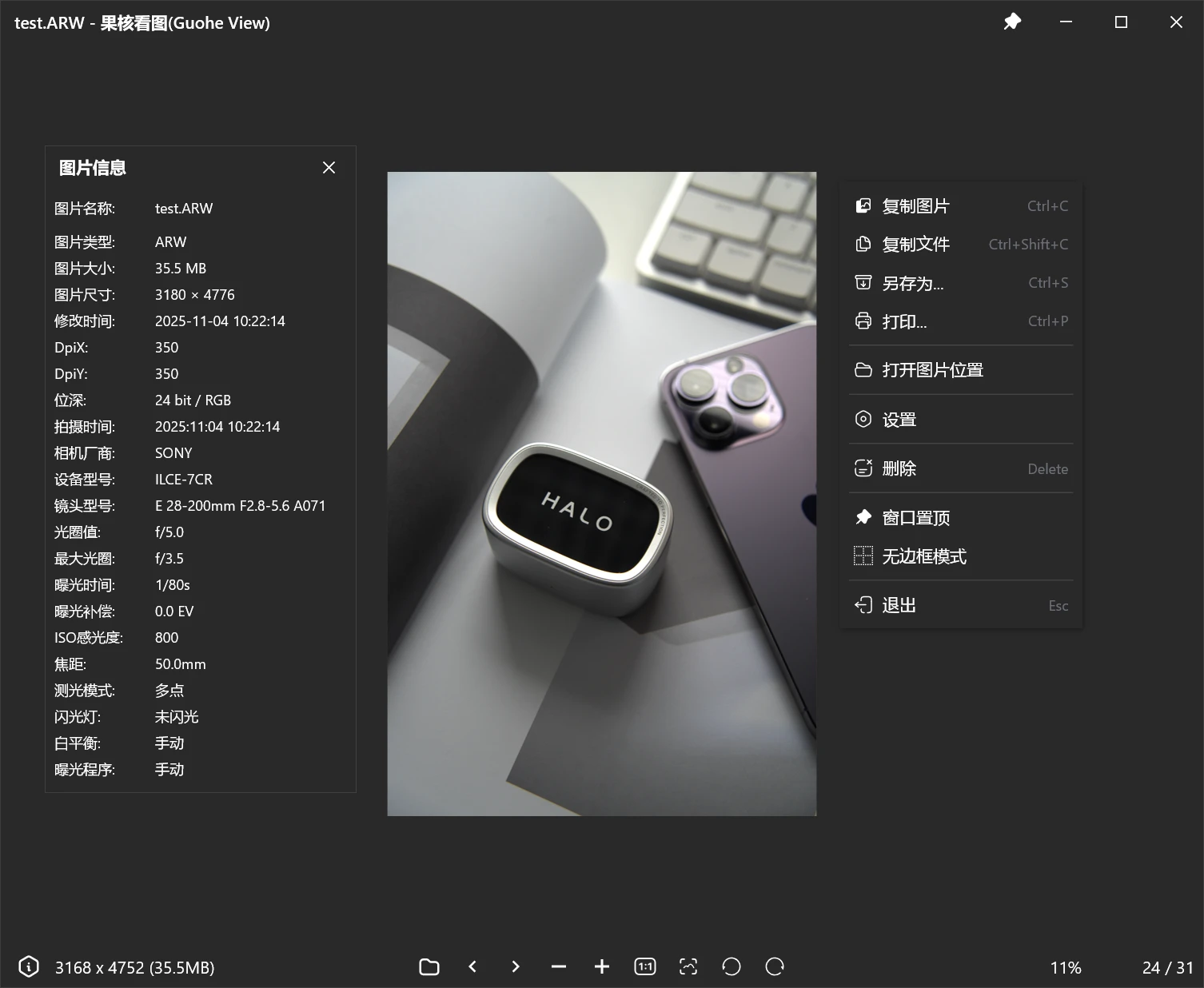
90+ 格式通吃,相机原片直读

JPEG / PNG / WebP / AVIF / HEIC / GIF 动图 / SVG 矢量图、PSD / AI / EPS 设计稿、TIFF / EXR 以及 Sony
ARW、Canon CR3、Nikon NEF、Fuji RAF、Adobe DNG 等 20+ 种相机 RAW——一个软件全部直接打开,不用第三方插件。

完整的 EXIF 元数据 

图片信息窗口显示 22个字段:拍摄时间、相机型号、镜头、光圈、快门、ISO、焦距、测光模式、闪光灯、白平衡、曝光程序等等。

专业色彩管理

自带 ICC 色彩管理:图片的 ICC 配色 + 显示器的 ICC 校色,两端都正确还原。深色 / 浅色主题、抗锯齿开关。

更新日志

v3.0.5

文件类型图标全套重制,小尺寸图标全新设计
删除图片支持"删除后放入回收站"
工具栏新增逆时针旋转按钮
文件排序跟随资源管理器
SVG 支持缩略图
资源管理器"类型"列显示对应格式
软件版本更新允许跳过
置顶图标改成默认空心
优化超大图展示逻辑
全新PEG 解码、TIFF 解码器、打开图片速度快10倍(设置->性能。如果有问题请关闭)

v3.0.4

1、修复多屏幕显示问题
2、兼容更多PSD文件预览图
3、修复部分SVG文件缩略图
4、修复部分文件镜像显示
5、新增图片信息窗口每个参数支持点击复制
6、解码器引入多线程机制,大幅度提高PSD/TIF图片解码速度
7、修复卸载报错
8、修复透明TIF图片变成白底

v3.0.3

全新架构发布 用3.0.0版本以前的用户推荐先卸载后安装
大幅精简程序体积
大幅度提高性能
SVG原生渲染
图片信息展示直方图
更多图片格式支持
新增快捷键自定义
新增鼠标切换/缩放图片选项
果核看图(GuoHeView) 专业看图软件 v3.0.5

下载地址

功能规划、意见反馈请查看:https://pic.ghxi.com/roadmap

(提意见最好走上面去,这样可以排期)

反馈Q群:1075284401

https://www.123865.com/s/HQeA-SDFSh

安装包:高速下载

绿色版:高速下载

如果您喜欢本站,点击这儿不花一分钱捐赠本站

这些信息可能会帮助到你: 下载帮助 | 报毒说明 | 进站必看

修改版本安卓软件,加群提示为修改者自留,非本站信息,注意鉴别

(61)
上一篇 3天前
下一篇 3天前

相关推荐

发表回复

评论问题之前,点击我,能帮你解决大部分问题

您的电子邮箱地址不会被公开。 必填项已用*标注

评论列表(351条)

  • 1019553982
    1019553982 2025年12月16日 下午5:30
    Google Chrome 130.0.0.0 Google Chrome 130.0.0.0 Windows 11 x64 Edition Windows 11 x64 Edition

    能不能出一个安装版,这种日用频率高的安装版会更方便

  • psy10000
    psy10000 2025年12月15日 上午9:32
    Firefox 128.0 Firefox 128.0 Windows 10 x64 Edition Windows 10 x64 Edition

    打不开文件名有百分号的图片。

    • psy10000
      psy10000 2025年12月15日 上午9:36
      Firefox 128.0 Firefox 128.0 Windows 10 x64 Edition Windows 10 x64 Edition

      打不开的文件名:AI-Generated-%E8%AF%9B%E4%BB%99-%E5%B0%8F%E7%99%BD-0004-5174.jpg

  • zaoc
    zaoc 2025年12月14日 上午11:18
    Microsoft Edge 143.0.0.0 Microsoft Edge 143.0.0.0 Windows 11 x64 Edition Windows 11 x64 Edition

    请求添加排版打印功能

  • rave1042
    rave1042 2025年12月13日 下午7:34
    Google Chrome 126.0.0.0 Google Chrome 126.0.0.0 Windows 10 x64 Edition Windows 10 x64 Edition

    站长大佬能不能在界面底部加个文件夹内图片的缩略图呢(类似2345或者wps看图),方便跳转文件夹内图片

  • rave1042
    rave1042 2025年12月13日 下午7:08
    Google Chrome 126.0.0.0 Google Chrome 126.0.0.0 Windows 10 x64 Edition Windows 10 x64 Edition

    我来试试,最近刚好在找好用的看图工具,公司it把某图王给禁了不让用

  • 波屁
    波屁 2025年12月12日 下午8:36
    Google Chrome 132.0.0.0 Google Chrome 132.0.0.0 Windows 10 x64 Edition Windows 10 x64 Edition

    FSViewer全能养老专用

  • lijia07
    lijia07 2025年12月12日 下午6:25
    Google Chrome 134.0.0.0 Google Chrome 134.0.0.0 Windows 10 x64 Edition Windows 10 x64 Edition

    实话实说,为什么这些功能imagine几M就能实现?

    • 果核剥壳
      年费VIP果核剥壳 2025年12月12日 下午7:09
      Google Chrome 141.0.0.0 Google Chrome 141.0.0.0 Windows 10 x64 Edition Windows 10 x64 Edition

      我们可以打开相机原图格式

    • 1019553982
      1019553982 2025年12月14日 下午11:21
      Google Chrome 130.0.0.0 Google Chrome 130.0.0.0 Windows 11 x64 Edition Windows 11 x64 Edition

      能不能出一个安装版,这种日用频率高的安装版会更方便

  • ding31
    ding31 2025年12月12日 下午5:55
    Microsoft Edge 143.0.0.0 Microsoft Edge 143.0.0.0 Windows 11 x64 Edition Windows 11 x64 Edition

    锐评一下,感觉还没visum这种uwp看图器快......

    • 果核剥壳
      年费VIP果核剥壳 2025年12月12日 下午6:13
      Google Chrome 141.0.0.0 Google Chrome 141.0.0.0 Windows 10 x64 Edition Windows 10 x64 Edition

      测试了新版没。有什么问题可以群里来反馈哦

  • 逝水之痕
    逝水之痕 2025年12月12日 上午1:15
    Google Chrome 119.0.6045.160 Google Chrome 119.0.6045.160 Windows 10 x64 Edition Windows 10 x64 Edition

    看图还得是
    FastStone Image Viewer

    FastStoneMaxView

  • Kenneth
    Kenneth 2025年12月11日 下午8:39
    Google Chrome 130.0.0.0 Google Chrome 130.0.0.0 Windows 10 x64 Edition Windows 10 x64 Edition

    再等等,,,,多等几个版本再下载,。

  • wwc1234
    wwc1234 2025年12月11日 下午8:10
    Firefox 140.0 Firefox 140.0 Windows 10 x64 Edition Windows 10 x64 Edition

    支持庆祝庆祝
    顺便,一排下去都是 Chromium 啊笑哭

    • huqiang
      huqiang 2025年12月11日 下午9:29
      Firefox 148.0 Firefox 148.0 GNU/Linux x64 GNU/Linux x64

      火狐来了

    • PopoLau
      PopoLau 2025年12月11日 下午9:46
      Firefox 146.0 Firefox 146.0 Windows 10 x64 Edition Windows 10 x64 Edition

      来了来了

    • sUN
      sUN 2025年12月14日 下午3:29
      Firefox 146.0 Firefox 146.0 Windows 10 x64 Edition Windows 10 x64 Edition

      必须火狐~ 经典永流传~

  • qq251311975
    qq251311975 2025年12月10日 上午10:22
    Google Chrome 143.0.0.0 Google Chrome 143.0.0.0 Windows 11 x64 Edition Windows 11 x64 Edition

    求桌面壁纸笑哭

  • 小恐龙
    小恐龙 2025年12月10日 上午9:47
    Google Chrome 134.0.0.0 Google Chrome 134.0.0.0 Windows 10 x64 Edition Windows 10 x64 Edition

    net8 的话, 程序本身就不会很快的.

  • mrbuxiaode
    mrbuxiaode 2025年12月10日 上午9:28
    Google Chrome 132.0.0.0 Google Chrome 132.0.0.0 Windows 11 x64 Edition Windows 11 x64 Edition

    增加【设置桌面壁纸】的功能

  • valentang
    valentang 2025年12月10日 上午9:22
    Google Chrome 143.0.0.0 Google Chrome 143.0.0.0 Windows 11 x64 Edition Windows 11 x64 Edition

    能不能不要显示那个“正在加载图片”晃得眼睛不舒服

  • xuzm
    xuzm 2025年12月9日 下午10:36
    Google Chrome 143.0.0.0 Google Chrome 143.0.0.0 Windows 11 x64 Edition Windows 11 x64 Edition

    用了一下,加载大图慢,有个天文图200mb,加载需求15-18秒。我还有一个9.4g的psd转成jpg200-400mb,cmyk颜色空间的,只有win11系统带的能打开。你这个如果做不好就是造了个轮子,之前我用的imageglass,因为功能看图够,也漂亮,但打开这个图要25秒-28秒,后来换了我平时做图片管理的另一款看图工具 fsviewer,需求5秒-6秒。我果断放弃了imageglass做默认看图工具。用 fsviewer做默认,关键 fsviewer能看视频啊。。。

    所以,如果做不到比 fsviewer优秀,就没必要造轮子了。

    果核b站推荐的对比的几款看图工具后来我因为要打开那个cmyk几百mb的图片,下载好几个第三方都不行。我不知道国核有这个实力吗?

    • 逝水之痕
      逝水之痕 2025年12月12日 上午1:15
      Google Chrome 119.0.6045.160 Google Chrome 119.0.6045.160 Windows 10 x64 Edition Windows 10 x64 Edition

      FastStone Image Viewer

      FastStoneMaxView

      这两种试试

    • julianw
      julianw 2025年12月12日 上午10:29
      Microsoft Edge 143.0.0.0 Microsoft Edge 143.0.0.0 Windows 11 x64 Edition Windows 11 x64 Edition

      他说的不就是这个吗

  • lizihuakai
    lizihuakai 2025年12月9日 下午10:04
    Microsoft Edge 143.0.0.0 Microsoft Edge 143.0.0.0 Windows 11 x64 Edition Windows 11 x64 Edition

    感觉也不是很快呢,需要等1秒,没有自带的照片快

  • 1204
    1204 2025年12月9日 下午9:41
    Microsoft Edge 143.0.0.0 Microsoft Edge 143.0.0.0 Windows 11 x64 Edition Windows 11 x64 Edition

    目前版本原图加载速度还是太慢了,再等等优化吧

  • 千山映雪
    千山映雪 2025年12月9日 下午8:10
    Google Chrome 143.0.0.0 Google Chrome 143.0.0.0 Windows 11 x64 Edition Windows 11 x64 Edition

    强势围观,一直在使用BandiView,现在体验一下

  • 嘻哈仔
    嘻哈仔 2025年12月9日 下午6:09
    Microsoft Edge 143.0.0.0 Microsoft Edge 143.0.0.0 Windows 10 x64 Edition Windows 10 x64 Edition

    说比2345快,我是2345多年老用户,体验了一下这个,说实话体验挺糟糕的,小尺寸的拉不开差距都是秒开,但大尺寸的2345也几乎无感打开,这个就不行了,还黑一下走个一两秒钟的进度条,很影响体验,你要么别显示进度条了。

    • 果核剥壳
      年费VIP果核剥壳 2025年12月9日 下午7:42
      Google Chrome 141.0.0.0 Google Chrome 141.0.0.0 Windows 10 x64 Edition Windows 10 x64 Edition

      已更新1.1.0,可以试试