
果核看图(GuoHeView) 专业看图软件 v3.1.0.86 - 果核剥壳

MagicView正式更命为果核看图GuoHeView,采用C++重构。

一款专为 Windows 打造的轻量级看图软件,基于自研 CORE UI
框架(Direct2D),追求极速打开、清晰渲染、无干扰浏览。免费、绿色、无广告、无后台。

软件特色

超高性能

多核加载图片,看图秒开。

启动到第一帧画面通常在 200ms 以内。超大图支持瓦片流式解码即时呈现,滚轮缩放跟手不掉帧。

90+ 格式通吃,相机原片直读

JPEG / PNG / WebP / AVIF / HEIC / GIF 动图 / SVG 矢量图、PSD / AI / EPS 设计稿、TIFF / EXR 以及 Sony
ARW、Canon CR3、Nikon NEF、Fuji RAF、Adobe DNG 等 20+ 种相机 RAW——一个软件全部直接打开,不用第三方插件。

完整的 EXIF 元数据 

图片信息窗口显示 22个字段:拍摄时间、相机型号、镜头、光圈、快门、ISO、焦距、测光模式、闪光灯、白平衡、曝光程序等等。

专业色彩管理

自带 ICC 色彩管理:图片的 ICC 配色 + 显示器的 ICC 校色,两端都正确还原。深色 / 浅色主题、抗锯齿开关。

更新日志

v3.1.0

新增 文件重命名,支持模板与预览
新增 自定义快捷键
新增 旋转后自动保存
新增 透明图片棋盘格背景
新增 自定义标题功能
新增 识别动态照片(只能识别,还没播放)
调整 工具栏自动隐藏为 1 秒
优化 改善 AI、ICO 图片兼容性与 JPG 透明导出
优化 修复拖出文件崩溃与图片信息闪动

v3.0.8
新增全屏模式
新 PSD / PSB / AI 资源管理器缩略图添加方框
新增 DDS图片解码
优化无边框模式效果,新增缩放百分比显示
优化文字显示效果,减轻文字锯齿感。
优化菜单图标显示
修复滚轮切换到坏图后卡住的问题。
修复 PSD / PSB / CMYK 相关显示问题。
修复 Gray32Float TIFF 打不开的问题。
修复多类 SVG 显示问题
修复拖窗、缩放、无边框模式下的多处抖动和闪动问题。

v3.0.5

文件类型图标全套重制,小尺寸图标全新设计
删除图片支持"删除后放入回收站"
工具栏新增逆时针旋转按钮
文件排序跟随资源管理器
SVG 支持缩略图
资源管理器"类型"列显示对应格式
软件版本更新允许跳过
置顶图标改成默认空心
优化超大图展示逻辑
全新PEG 解码、TIFF 解码器、打开图片速度快10倍(设置->性能。如果有问题请关闭)

v3.0.4

1、修复多屏幕显示问题
2、兼容更多PSD文件预览图
3、修复部分SVG文件缩略图
4、修复部分文件镜像显示
5、新增图片信息窗口每个参数支持点击复制
6、解码器引入多线程机制,大幅度提高PSD/TIF图片解码速度
7、修复卸载报错
8、修复透明TIF图片变成白底

v3.0.3

全新架构发布 用3.0.0版本以前的用户推荐先卸载后安装
大幅精简程序体积
大幅度提高性能
SVG原生渲染
图片信息展示直方图
更多图片格式支持
新增快捷键自定义
新增鼠标切换/缩放图片选项
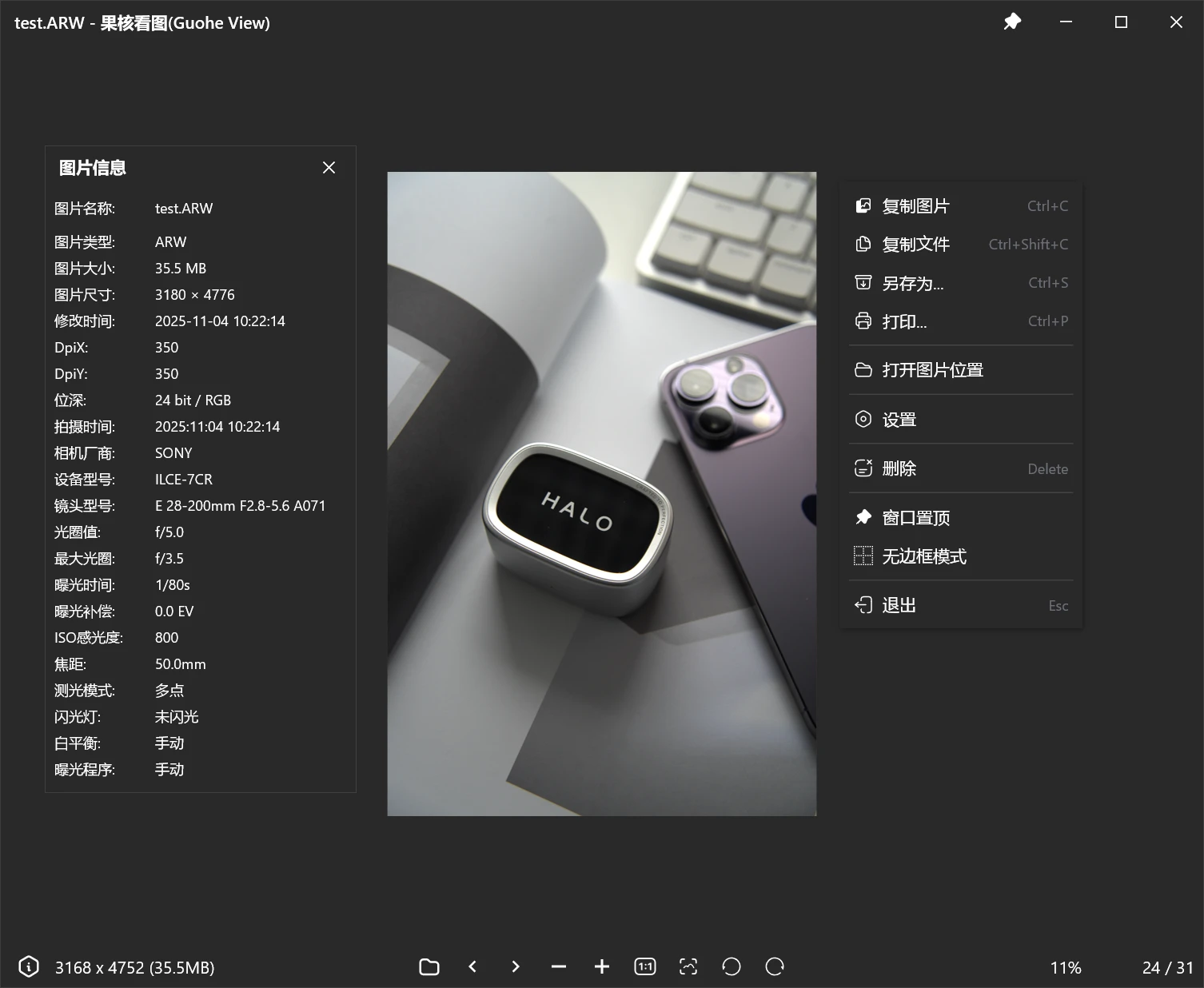
果核看图(GuoHeView) 专业看图软件 v3.1.0.86

下载地址

功能规划、意见反馈请查看:https://pic.ghxi.com/roadmap

(提意见最好走上面去,这样可以排期)

反馈Q群:1075284401

https://www.123865.com/s/HQeA-SDFSh

安装包:高速下载

绿色版:高速下载

如果您喜欢本站,点击这儿不花一分钱捐赠本站

这些信息可能会帮助到你: 下载帮助 | 报毒说明 | 进站必看

修改版本安卓软件,加群提示为修改者自留,非本站信息,注意鉴别

(73)
上一篇 6小时前
下一篇 4小时前

相关推荐

发表回复

评论问题之前,点击我,能帮你解决大部分问题

您的电子邮箱地址不会被公开。 必填项已用*标注

评论列表(377条)

  • 飞天猫有9条命
    飞天猫有9条命 2026年1月4日 下午3:11
    Microsoft Edge 142.0.0.0 Microsoft Edge 142.0.0.0 Windows 11 x64 Edition Windows 11 x64 Edition

    1 - 按照100%显示

  • 飞天猫有9条命
    飞天猫有9条命 2026年1月4日 下午3:11
    Microsoft Edge 142.0.0.0 Microsoft Edge 142.0.0.0 Windows 11 x64 Edition Windows 11 x64 Edition

    TAB - 图片信息窗靠边显示礼物

  • 尘
    2026年1月4日 上午11:55
    Google Chrome 118.0.0.0 Google Chrome 118.0.0.0 Windows 10 x64 Edition Windows 10 x64 Edition

    我去官网下载酷

  • 这个人很懒
    这个人很懒 2026年1月4日 上午11:19
    Google Chrome 143.0.0.0 Google Chrome 143.0.0.0 Windows 10 x64 Edition Windows 10 x64 Edition

    放大缩小的平滑问题解决了吗

  • 25165
    25165 2026年1月4日 上午10:59
    Firefox 146.0 Firefox 146.0 Windows 10 x64 Edition Windows 10 x64 Edition

    没有上下翻页嘛,希望能加个翻页功能,看照片的时候有点不方便

    • 25165
      25165 2026年1月4日 上午11:12
      Firefox 146.0 Firefox 146.0 Windows 10 x64 Edition Windows 10 x64 Edition

      找到了,是有的,我刚开始没看到

  • 百万战神
    百万战神 2026年1月4日 上午10:57
    Google Chrome 134.0.0.0 Google Chrome 134.0.0.0 Windows 10 x64 Edition Windows 10 x64 Edition

    什么时候支持预览PDF,什么时候支持图片的简单裁剪和分辨率缩放啊

  • 8601787
    8601787 2026年1月4日 上午10:43
    Google Chrome 132.0.0.0 Google Chrome 132.0.0.0 Windows 10 x64 Edition Windows 10 x64 Edition

    果大,请教个问题,这个软件有没有修改照片身份信息的功能?比方,拍摄时间,拍摄设备之类 的。

    • 逍遥在南方
      逍遥在南方 2026年1月4日 上午10:59
      Microsoft Edge 143.0.0.0 Microsoft Edge 143.0.0.0 Windows 11 x64 Edition Windows 11 x64 Edition

      补充,你提到的信息叫EXIF信息(Exchangeable Image File Format),可交换图像文件格式

  • 柴郡
    柴郡 2026年1月4日 上午9:37
    Firefox 143.0 Firefox 143.0 Windows 10 x64 Edition Windows 10 x64 Edition

    微笑eagle要是也有这种预加载技术就好了

  • gitmob
    gitmob 2026年1月3日 下午9:45
    Microsoft Edge 143.0.0.0 Microsoft Edge 143.0.0.0 Windows 11 x64 Edition Windows 11 x64 Edition

    不是,能不能不要安装到我的D盘,跟国产软件一样,老是在其他盘里拉屎,就这一点直接秒卸

    • 果核剥壳
      年费VIP果核剥壳 2026年1月3日 下午10:08
      Google Chrome 143.0.0.0 Google Chrome 143.0.0.0 Windows 10 x64 Edition Windows 10 x64 Edition

      ?我第一次遇到说不要装D盘的。还有装哪儿不是自己选么。另外还提供绿色版。

    • gitmob
      gitmob 2026年1月3日 下午10:14
      Microsoft Edge 143.0.0.0 Microsoft Edge 143.0.0.0 Windows 11 x64 Edition Windows 11 x64 Edition

      你的安装程序默认就是D盘,不信我可以截图,默认安装位置,要不就是:C:\Program Files,全局用户的安装目录,要不就是:C:\Users\XXX\AppData\Local\Programs 这种用户级的目录,但是安装到其他盘就跟你到处拉屎一样,搞的根目录乱七八糟的

    • 果核剥壳
      年费VIP果核剥壳 2026年1月4日 上午8:21
      Google Chrome 143.0.0.0 Google Chrome 143.0.0.0 Windows 10 x64 Edition Windows 10 x64 Edition

      本来就是安装到其他盘比较好。安装到C盘才是拉屎。还有你不喜欢D盘你就自己选不就完了嘛,好像我把你手按着没给你选择一样。

    • cyanx
      cyanx 2026年1月4日 下午4:36
      Firefox 146.0 Firefox 146.0 Windows 10 x64 Edition Windows 10 x64 Edition

      现在SSD普及后,品牌笔记本都不分盘了,要扩展也是整个盘一个分区,不用了也方便卸走。也许一部分人已(比如我)已经被迫养成了一个C盘的习惯,只要软件路径合理(Program Files 之类)其实也可以接受。

    • 斗小虎
      斗小虎 2026年1月4日 上午10:10
      Firefox 146.0 Firefox 146.0 Windows 10 x64 Edition Windows 10 x64 Edition

      头一次见要求不要安装在D盘的。。。。我看到默认装到D盘还在心里给果核点赞呢

    • 这个人很懒
      这个人很懒 2026年1月4日 下午2:21
      Google Chrome 143.0.0.0 Google Chrome 143.0.0.0 Windows 10 x64 Edition Windows 10 x64 Edition

      人家D盘有可能是机械盘,影响运行速度

  • falloutasn
    falloutasn 2026年1月3日 下午5:03
    Google Chrome 132.0.0.0 Google Chrome 132.0.0.0 Windows 10 x64 Edition Windows 10 x64 Edition

    没有打印功能,还是要用回系统自带的看图

  • 劉宇魔
    劉宇魔 2026年1月3日 下午4:27
    Google Chrome 132.0.0.0 Google Chrome 132.0.0.0 Windows 11 x64 Edition Windows 11 x64 Edition

    2345看图王有个功能我挺喜欢,就是看图顺序是跟随文件管理器的排列顺序来的,不管文件管理器切换名称、日期 、类型、大小等排序方式 ,看图王都能按照相应的排序来浏览看图,期待MagicView也能实现这个功能

  • messier104
    messier104 2026年1月3日 下午1:06
    Google Chrome 143.0.0.0 Google Chrome 143.0.0.0 Windows 11 x64 Edition Windows 11 x64 Edition

    如果性能和功能都超过BandiView就更好了

    • 果核剥壳
      年费VIP果核剥壳 2026年1月3日 下午1:20
      Google Chrome 143.0.0.0 Google Chrome 143.0.0.0 Windows 10 x64 Edition Windows 10 x64 Edition

      性能已经比上了。但是功能差一些酷

    • Ultraman
      年费VIPUltraman 2026年1月3日 下午6:57
      Microsoft Edge 144.0.0.0 Microsoft Edge 144.0.0.0 Windows 11 x64 Edition Windows 11 x64 Edition

      再大胆一点,直接在bandizip里替代bandiview酷

    • 逍遥在南方
      逍遥在南方 2026年1月4日 上午11:20
      Microsoft Edge 143.0.0.0 Microsoft Edge 143.0.0.0 Windows 11 x64 Edition Windows 11 x64 Edition

      bandiview毕竟是商业软件,有大量资金投入开发,功能完善些是正常的,magicview毕竟是免费,等后面完善~

  • goeway
    goeway 2026年1月1日 上午1:54
    Microsoft Edge 143.0.0.0 Microsoft Edge 143.0.0.0 Windows 10 x64 Edition Windows 10 x64 Edition

    只能浏览不能删除?

    • 果核剥壳
      年费VIP果核剥壳 2026年1月3日 下午12:17
      Google Chrome 143.0.0.0 Google Chrome 143.0.0.0 Windows 10 x64 Edition Windows 10 x64 Edition

      功能已经规划了

  • cherub0507
    cherub0507 2025年12月30日 下午5:19
    Google Chrome 143.0.0.0 Google Chrome 143.0.0.0 Windows 11 x64 Edition Windows 11 x64 Edition

    图片主流格式支持已经很好了,打开也很快,非常感谢

    目前需求:

    • cherub0507
      cherub0507 2025年12月30日 下午5:21
      Google Chrome 143.0.0.0 Google Chrome 143.0.0.0 Windows 11 x64 Edition Windows 11 x64 Edition

      1. 视图随图片大小方向调整,当图片分辨率超过屏幕分辨率时,则显示为最大;
      2. 视图置顶;
      3. 视图无边框

    • 果核剥壳
      年费VIP果核剥壳 2026年1月3日 下午12:18
      Google Chrome 143.0.0.0 Google Chrome 143.0.0.0 Windows 10 x64 Edition Windows 10 x64 Edition

      不分功能已经规划

  • AAA
    AAA 2025年12月29日 下午5:37
    Google Chrome 134.0.0.0 Google Chrome 134.0.0.0 Windows 11 x64 Edition Windows 11 x64 Edition

    增加删除 功能 增加 滚轮翻页 现在功能太少了

  • A
    A 2025年12月29日 上午10:29
    Microsoft Edge 143.0.0.0 Microsoft Edge 143.0.0.0 Windows 10 x64 Edition Windows 10 x64 Edition

    浏览中不支持删除,很不方便,换回WPS看图了

  • 2420880737
    2420880737 2025年12月28日 上午10:23
    Google Chrome 134.0.0.0 Google Chrome 134.0.0.0 Windows 10 x64 Edition Windows 10 x64 Edition

    非常好用,非常有担当,比那些只为利益驱使的腾某讯强太多了赞

  • JaysonStatham
    JaysonStatham 2025年12月27日 下午12:35
    Microsoft Edge 143.0.0.0 Microsoft Edge 143.0.0.0 Windows 10 x64 Edition Windows 10 x64 Edition

    很不错!软件很好用

  • 13242271262
    13242271262 2025年12月26日 上午11:19
    Firefox 138.0 Firefox 138.0 Windows 10 x64 Edition Windows 10 x64 Edition

    会增加删除功能吗?

  • ice
    ice 2025年12月26日 上午4:05
    Microsoft Edge 143.0.0.0 Microsoft Edge 143.0.0.0 Android 10 Android 10

    支持,果核最棒