

PixPin(截图工具) v3.1.0.6 - 果核剥壳

作者在平时的工作流中经常使用图片相关的工具,截图贴图:Snipaste; Ocr:PearOCR; 长截图截动图:QQ 截图; 不过经常切换软件还是比较麻烦,于是写了一个新的截图工具,并且加上 PearOCR 的离线识别引擎,把日常用到的相关功能都集合在一起,PixPin 诞生了。

软件特色

截图
自动识别窗口元素,可使用滚轮切换父/子元素
附带各种标注工具

贴图
把剪贴板的图片/文字贴到其他窗口最上层,方便参考查阅
自动识别图片上的文字,离线识别引擎,无数据上传
提供标注工具方便二次标注

截长图
智能图像识别算法自动捕捉滚动的图片

截动图
把操作过程保存为 Gif/Png/Webp 动图
提供标注过程,可以在录制过程中方便地标注

软件截图
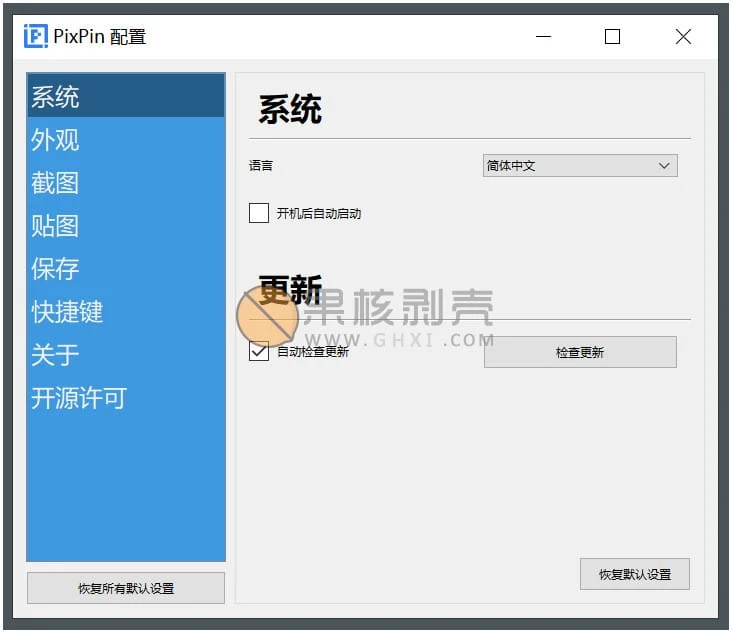
PixPin(截图工具) v3.1.0.6

更新日志

功能
【标注】增加自动马赛克标注工具

自动马赛克

【贴图】贴图菜单增加鼠标穿透,可在配置-快捷键/动作,设置开启/关闭鼠标穿透快捷键

鼠标穿透

【贴图】可以在贴图上按下 Tab 将焦点转移到另一个贴图
【贴图】增加默认置顶或者不置顶的设置,配置-贴图-贴图窗口置顶
【录制】增加快速录制模式,大大提高导出速度
【聚光灯】Ctrl+滚轮可以调整聚光灯描边
【MacOS】MacOS 也支持文件贴图了
【翻译】翻译对话框可选择是否显示原文
【会员】增加多种工业条码识别功能,包括但不限于Code128,EAN13,UPCA,Code39,DataMatrix,PDF417
【会员】自动马赛克可以设置同步操作,开启后可以对相同内容同时增加/删除马赛克

优化
【截图】在开启圆角截图时,鼠标移动到截图区域的角点附近会出现圆角控制点
【贴图】现在在 VSCode 上复制的文件也能贴图了
【贴图】在贴图没有置顶的时候,会在任务栏显示图标
【标注】序列号标注增加手动设置序号
【录屏】延时截图/录制的时候会有明确的倒计时指示
【录屏】优化快速播放时的声音效果
【保存】新版保存对话框在弹出时焦点默认在文件名上,可快速修改后按下回车保存
【保存】保存对话框的路径标签增加编辑按钮
【二维码】优化二维码识别的体验
【会员】MacOS 系统的翻译快捷键修改为 Option+Q
【会员】提高表格识别的准确性

修复
【截图】截图区域较小情况下,刷新截图按钮与其他按钮重叠
【截图】识别文字时快速按下复制键会导致复制失败
【截图】无法从左上角开始截图
【截图】历史截图无法撤销标注
【截图】长按刷新截图按钮时图标没有稳定居中旋转
【贴图】文字贴图在某些场景下会看不到文字
【贴图】连续关闭贴图的时候焦点转移到其他窗口
【标注】配置中"删除序列号时修改其他项"功能不生效
【标注】配置中橡皮擦启用二次编辑无效
【标注】矩形标注中旋转矩形会有大量锯齿
【录屏】录制暂停后开始会丢失暂停前的键盘录制
【长截图】长截图无法调整选区
【配置】某些场景下配置没有保存
【悬浮球】悬浮工具栏移动位置后一段时间返回了主屏幕中间上方

下载链接

如无法启动软件,可尝试右键使用管理员权限打开

https://pan.quark.cn/s/c8edd8b57a9b

https://pan.xunlei.com/s/VOL3W-jPfdL-GF2lYui3E5MNA1?pwd=vywc#

已高速(如有密码:3519)http://ct.ghpym.com/d/7369060-58713733-609614

PixPin(截图工具) v3.1.0.6VIP高速直链
果核剥壳独家直链,无需网盘直接下载,省时省力
普通用户每天也提供免费下载次数
隐藏内容,VIP可见

如果您喜欢本站,点击这儿不花一分钱捐赠本站

这些信息可能会帮助到你: 下载帮助 | 报毒说明 | 进站必看

修改版本安卓软件,加群提示为修改者自留,非本站信息,注意鉴别

(114)
上一篇 5天前
下一篇 5天前

相关推荐

回复 hulu

评论问题之前,点击我,能帮你解决大部分问题

您的电子邮箱地址不会被公开。 必填项已用*标注

评论列表(232条)

  • 夏天
    夏天 2024年8月8日 下午9:47
    Google Chrome 112.0.0.0 Google Chrome 112.0.0.0 Windows 10 x64 Edition Windows 10 x64 Edition

    已更新1.8.22.0了,提示更新很烦,啥时候跟上赞

  • 11
    11 2024年8月2日 上午11:08
    Google Chrome 127.0.0.0 Google Chrome 127.0.0.0 Mac OS X  10.15.7 Mac OS X 10.15.7

    10.15.7 用不了直接闪退,屏幕录制权限没有pixpin。有相同问题的吗?

  • EZXO
    EZXO 2024年8月1日 上午11:11
    Google Chrome 119.0.6045.160 Google Chrome 119.0.6045.160 Windows 10 x64 Edition Windows 10 x64 Edition

    全局鼠标这个功能纯纯抄袭Snipaste[擦汗]

  • EQun
    EQun 2024年7月26日 下午12:06
    Microsoft Edge 126.0.0.0 Microsoft Edge 126.0.0.0 Windows 10 x64 Edition Windows 10 x64 Edition

    没有fs轻巧好用

  • around999
    around999 2024年7月20日 下午2:15
    Microsoft Edge 124.0.0.0 Microsoft Edge 124.0.0.0 Windows 10 x64 Edition Windows 10 x64 Edition

    截长图我只服QQ截图,pixpin截不了的QQ没问题。

    • kl_upc
      kl_upc 2024年7月22日 上午10:33
      Google Chrome 119.0.0.0 Google Chrome 119.0.0.0 Windows 10 x64 Edition Windows 10 x64 Edition

      QQ长截图变化不多的也不行,还是fs旧版本靠谱

    • 明月相依
      明月相依 2024年7月22日 下午3:10
      Google Chrome 112.0.0.0 Google Chrome 112.0.0.0 Windows 11 x64 Edition Windows 11 x64 Edition

      QQ截图最近大更新了,现在感觉没一个能和它比

    • kl_upc
      kl_upc 2024年8月5日 下午8:34
      Google Chrome 119.0.0.0 Google Chrome 119.0.0.0 Windows 11 x64 Edition Windows 11 x64 Edition

      大更新也不行

    • kay0726
      kay0726 2024年8月2日 上午10:09
      Google Chrome 112.0.0.0 Google Chrome 112.0.0.0 Windows 11 x64 Edition Windows 11 x64 Edition

      但是QQ不能截GIF

  • yusihua103
    yusihua103 2024年7月16日 下午2:30
    Microsoft Edge 122.0.0.0 Microsoft Edge 122.0.0.0 Windows 10 x64 Edition Windows 10 x64 Edition

    长截图功能没法用,只有gif功能

    • fish
      fish 2024年7月20日 上午10:03
      Microsoft Edge 126.0.0.0 Microsoft Edge 126.0.0.0 Windows 10 x64 Edition Windows 10 x64 Edition

      你要先框选滚动时会发生变化的区域,如果不变的区域太少,就容易识别失败,无法拼接

    • yusihua103
      yusihua103 2024年7月27日 下午2:19
      Microsoft Edge 122.0.0.0 Microsoft Edge 122.0.0.0 Windows 10 x64 Edition Windows 10 x64 Edition

      非常感谢,确实发现有这个现象,不过有时长截图滚动时画面会出现停止卡顿现象,不知道你是否有此种情况?

    • yusihua103
      yusihua103 2024年7月27日 下午2:21
      Microsoft Edge 122.0.0.0 Microsoft Edge 122.0.0.0 Windows 10 x64 Edition Windows 10 x64 Edition

      非常感谢,确实发现有这个现象,不过有时长截图滚动时画面会出现停止、卡顿现象,滚动范围和截图情况不一致,不知道你是否有此种情况?

    • fish
      fish 2024年7月28日 上午11:17
      Microsoft Edge 127.0.0.0 Microsoft Edge 127.0.0.0 Windows 10 x64 Edition Windows 10 x64 Edition

      暂时没有发现这个问题,截图滚动均匀、平缓,可能更好些

  • hooligan
    hooligan 2024年7月8日 下午10:42
    Microsoft Edge 126.0.0.0 Microsoft Edge 126.0.0.0 Windows 10 x64 Edition Windows 10 x64 Edition

    作者是多久都没出一个正式版了,最后的正式版还是1.7.6,已经落后太多了

  • lee
    lee 2024年6月3日 下午10:45
    Microsoft Edge 125.0.0.0 Microsoft Edge 125.0.0.0 Windows 10 x64 Edition Windows 10 x64 Edition

    绿色版和安装包版有什么区别
    绿色版去除了什么呀

    • Black
      Black 2024年6月20日 上午10:46
      Microsoft Edge 126.0.0.0 Microsoft Edge 126.0.0.0 Windows 11 x64 Edition Windows 11 x64 Edition

      绿色版就是免安装直接用而已

  • 小鹤双拼烧鹅
    小鹤双拼烧鹅 2024年6月3日 下午4:57
    Google Chrome 127.0.0.0 Google Chrome 127.0.0.0 Windows 11 x64 Edition Windows 11 x64 Edition

    官网都还是旧版笑哭

    • hbcz
      hbcz 2024年6月26日 上午8:37
      Microsoft Edge 123.0.0.0 Microsoft Edge 123.0.0.0 Windows 10 x64 Edition Windows 10 x64 Edition

      你去看官网的测试版

    • mumm1
      mumm1 2024年7月26日 下午3:49
      Microsoft Edge 126.0.0.0 Microsoft Edge 126.0.0.0 Windows 11 x64 Edition Windows 11 x64 Edition

      官网也没有测试版的入口啊

  • TTPod
    TTPod 2024年6月3日 上午10:56
    Microsoft Edge 125.0.0.0 Microsoft Edge 125.0.0.0 Windows 11 x64 Edition Windows 11 x64 Edition

    FS 10.5屏幕贴图,文字识别,各种标注功能都有,我选择FS咧嘴笑

    • kl_upc
      kl_upc 2024年11月5日 下午3:27
      Google Chrome 119.0.0.0 Google Chrome 119.0.0.0 Windows 10 x64 Edition Windows 10 x64 Edition

      FS10比fs9差的多,长截图自动滚动10和9没法比,不知设计者怎么想的,要么就做好自动滚动,做不好用旧版的点击下拉框也行,不伦不类的

  • Huaerbushi
    Huaerbushi 2024年6月1日 下午10:14
    Google Chrome 120.0.0.0 Google Chrome 120.0.0.0 Windows 11 x64 Edition Windows 11 x64 Edition

    可是QQ微信截图还有提取文字,翻译,转表格,这个难办了吧

  • kl_upc
    kl_upc 2024年5月27日 下午2:48
    Google Chrome 119.0.0.0 Google Chrome 119.0.0.0 Windows 10 x64 Edition Windows 10 x64 Edition

    长截图有bug,不如faststone和qq

  • kl_upc
    kl_upc 2024年5月27日 下午1:53
    Google Chrome 119.0.0.0 Google Chrome 119.0.0.0 Windows 10 x64 Edition Windows 10 x64 Edition

    https://www.123pan.com/s/HQeA-LvpSh.html

    介绍的网页有123云盘,这里为啥就不用啊,123云盘多好

    • zhy
      zhy 2024年7月18日 上午5:07
      Microsoft Edge 126.0.0.0 Microsoft Edge 126.0.0.0 Windows 11 x64 Edition Windows 11 x64 Edition

      感谢

  • ylzh
    ylzh 2024年5月26日 下午7:09
    Google Chrome 125.0.0.0 Google Chrome 125.0.0.0 Windows 11 x64 Edition Windows 11 x64 Edition

    奇怪, 难道就我一个人用PixPin更流畅吗. 进入截图模式后 鼠标的移动感觉, 比Snipaste流畅很多.
    主要是OCR和长截图好用. 轻便使用就PixPin, 稍微需要编辑一下的就FS.
    Snipaste没啥优势了.

    • kl_upc
      kl_upc 2024年6月3日 上午11:45
      Google Chrome 119.0.0.0 Google Chrome 119.0.0.0 Windows 10 x64 Edition Windows 10 x64 Edition

      比snipaste流畅,占用内存也小

  • centis
    centis 2024年5月23日 上午12:35
    Microsoft Edge 125.0.0.0 Microsoft Edge 125.0.0.0 Windows 11 x64 Edition Windows 11 x64 Edition

    笑死了,之前觉得响应不够快换回Snipaste了,想在等等优化,结果v1.8.10.0出会员功能了

    • AUNSEN
      AUNSEN 2024年5月24日 上午12:01
      Firefox 126.0 Firefox 126.0 Windows 10 x64 Edition Windows 10 x64 Edition

      这么快就开始收割了翻白眼

    • 风勿行
      风勿行 2024年5月24日 下午6:38
      Firefox 127.0 Firefox 127.0 Windows 10 x64 Edition Windows 10 x64 Edition

      说收割,言之过早。非会员功能够用就不叫收割,会员功能不是刚需也不能算收割吧。你看看官网上目前只有3个会员功能:图像贴图标主时选择文本范围、GIF录制时记录鼠标/键盘操作、双击箭头标注添加标注文本。这也算不了啥收割,现在够用了。赞

  • 剥果壳核
    剥果壳核 2024年5月22日 下午1:46
    Microsoft Edge 125.0.0.0 Microsoft Edge 125.0.0.0 GNU/Linux x64 GNU/Linux x64

    好奇怪啊,我这边为啥没有自动更新啊,官网显示最新为ver 1.7.6啊

    • centis
      centis 2024年5月23日 上午12:30
      Microsoft Edge 125.0.0.0 Microsoft Edge 125.0.0.0 Windows 11 x64 Edition Windows 11 x64 Edition

      点击八次自动更新进入测试版,最近更新的都是测试版

    • 剥果壳核
      剥果壳核 2024年5月23日 上午9:13
      Microsoft Edge 125.0.0.0 Microsoft Edge 125.0.0.0 GNU/Linux x64 GNU/Linux x64

      感谢,原来如此。还有我这边是在微软商店下载安装的,没有找到自动更新的按钮。之前都是自己弹出更新消息的

  • 进取的JINN
    进取的JINN 2024年5月22日 上午11:03
    Google Chrome 122.0.6261.95 Google Chrome 122.0.6261.95 Windows 10 x64 Edition Windows 10 x64 Edition

    只能再见了,稳定性太差,界面和功能模仿的Snipaste,半成品

    • kl_upc
      kl_upc 2024年5月27日 下午2:48
      Google Chrome 119.0.0.0 Google Chrome 119.0.0.0 Windows 10 x64 Edition Windows 10 x64 Edition

      比Snipaste还是要强

  • hbcz
    hbcz 2024年4月12日 下午4:49
    Microsoft Edge 123.0.0.0 Microsoft Edge 123.0.0.0 Windows 10 x64 Edition Windows 10 x64 Edition

    长屏截图不能自动滚动,好像是FSCapture这个软件长图截图特别好用。

    • kl_upc
      kl_upc 2024年6月3日 上午11:46
      Google Chrome 119.0.0.0 Google Chrome 119.0.0.0 Windows 10 x64 Edition Windows 10 x64 Edition

      长截图qq的最好,现在fs改的也不行了10以前还行,自动识别对于服务器上的直接就不能滚动

  • 呕吼
    呕吼 2024年4月10日 上午9:36
    Microsoft Edge 123.0.0.0 Microsoft Edge 123.0.0.0 Windows 10 x64 Edition Windows 10 x64 Edition

    诚通网盘慢的要死

  • 少装点怪
    少装点怪 2024年4月7日 上午10:43
    Google Chrome 123.0.0.0 Google Chrome 123.0.0.0 Mac OS X  10.15.7 Mac OS X 10.15.7

    尽快退出mac版啊