
PixPin(截图工具) v3.5.5.1 - 果核剥壳

作者在平时的工作流中经常使用图片相关的工具,截图贴图:Snipaste; Ocr:PearOCR; 长截图截动图:QQ 截图; 不过经常切换软件还是比较麻烦,于是写了一个新的截图工具,并且加上 PearOCR 的离线识别引擎,把日常用到的相关功能都集合在一起,PixPin 诞生了。

软件特色

截图
自动识别窗口元素,可使用滚轮切换父/子元素
附带各种标注工具

贴图
把剪贴板的图片/文字贴到其他窗口最上层,方便参考查阅
自动识别图片上的文字,离线识别引擎,无数据上传
提供标注工具方便二次标注

截长图
智能图像识别算法自动捕捉滚动的图片

截动图
把操作过程保存为 Gif/Png/Webp 动图
提供标注过程,可以在录制过程中方便地标注

软件截图
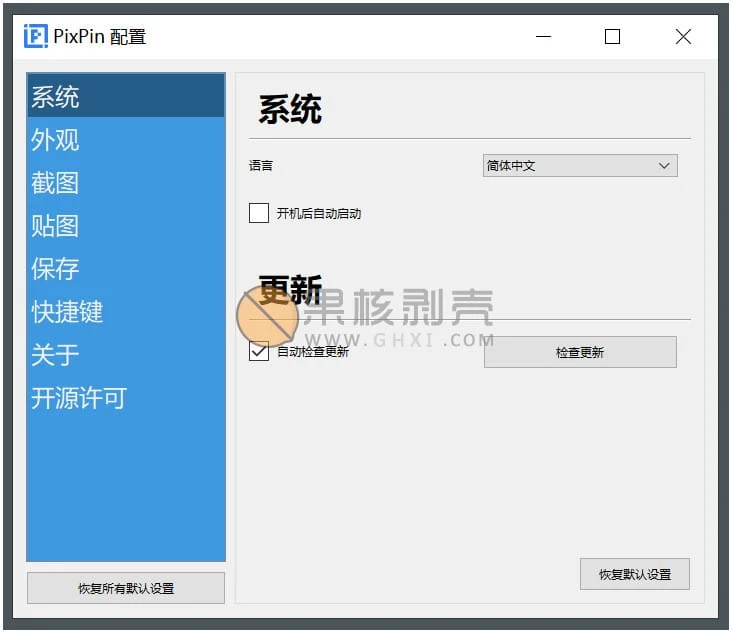
PixPin(截图工具) v3.5.5.1

更新日志

体验与性能优化
【录制】优化普通录制预览的性能占用。
【编辑】“编辑”窗口会记忆上次选择的置顶状态。
【录制】优化 Windows 和 macOS 的录制性能。
【录制】提高屏幕录制的码率。
问题修复
【标注】修复序号标注文字的换行逻辑问题。
【录制】修复屏幕录制计时器会计入暂停时间的问题。
【剪贴板】修复 macOS 设备通过 PixPin 获取的剪贴板内容无法通过微信输入法传输到 Windows 设备的问题。
【截图】修复 macOS 焦点位于副屏时无法切换多截图模式的问题。
【快捷键】修复快捷键无法录入 Tab 键的问题。
【表格识别】修复识别出的行列数与实际图片不符的问题。
【编辑】修复“编辑”窗口不置顶时工具栏的显示问题。
【保存】修复 Windows 保存路径符号不统一的问题。
【配置】修复 Windows 配置界面的缩放问题。
【全局鼠标】修复 macOS 可通过点按触发全局鼠标的问题。
【性能】修复 macOS 的内存问题。

下载链接

如无法启动软件,可尝试右键使用管理员权限打开

https://pan.quark.cn/s/4354c4b7c23e

https://pan.xunlei.com/s/VP-Iag-IF1rJp1_DyICXLnH_A1?pwd=6a3g#

已高速(如有密码:3519)http://ct.ghpym.com/d/7369060-58713733-609614

PixPin(截图工具) v3.5.5.1VIP高速直链
果核剥壳独家直链,无需网盘直接下载,省时省力
普通用户每天也提供免费下载次数
隐藏内容,VIP可见


如果您喜欢本站,点击这儿不花一分钱捐赠本站

这些信息可能会帮助到你: 下载帮助 | 报毒说明 | 进站必看

修改版本安卓软件,加群提示为修改者自留,非本站信息,注意鉴别

(126)
上一篇 5小时前
下一篇 5小时前

相关推荐

发表回复

评论问题之前,点击我,能帮你解决大部分问题

您的电子邮箱地址不会被公开。 必填项已用*标注

评论列表(243条)

  • 大汉小将军
    大汉小将军 2025年3月12日 上午8:33
    Microsoft Edge 134.0.0.0 Microsoft Edge 134.0.0.0 Windows 10 x64 Edition Windows 10 x64 Edition

    一直用正式版,没有使用这个测试版本

  • aaa2k
    年费VIPaaa2k 2025年2月25日 下午10:56
    Firefox 135.0 Firefox 135.0 Windows 10 x64 Edition Windows 10 x64 Edition

    挺好用的,买了

  • 行走的Windows
    行走的Windows 2025年2月21日 上午9:40
    Google Chrome 101.0.4951.64 Google Chrome 101.0.4951.64 Windows 11 x64 Edition Windows 11 x64 Edition

    目前我还是1.9.5版本

  • 三不真人
    三不真人 2025年2月17日 上午11:05
    Firefox 130.0 Firefox 130.0 Windows 10 x64 Edition Windows 10 x64 Edition

    不知道什么时候可以更新到2.0,到时候了我再更新。

    • 思染
      思染 2025年2月20日 下午8:19
      Google Chrome 133.0.0.0 Google Chrome 133.0.0.0 Windows 11 x64 Edition Windows 11 x64 Edition

      2.0了

  • 至少爱这个世界。
    至少爱这个世界。 2025年1月24日 下午10:20
    Microsoft Edge 131.0.0.0 Microsoft Edge 131.0.0.0 Windows 11 x64 Edition Windows 11 x64 Edition

    不错的工具~

  • 80191
    80191 2024年12月14日 下午5:43
    Google Chrome 101.0.4951.64 Google Chrome 101.0.4951.64 Windows 11 x64 Edition Windows 11 x64 Edition

    好用,长截图:按L键就可以了,方便

  • LEONUS
    LEONUS 2024年12月11日 上午11:06
    Microsoft Edge 130.0.0.0 Microsoft Edge 130.0.0.0 Windows 11 x64 Edition Windows 11 x64 Edition

    可惜苹果机 macOS Catalina 系统下,根本无法运行,一截图就退出笑哭笑哭笑哭

  • Aeon Lau
    Aeon Lau 2024年12月10日 下午4:08
    Microsoft Edge 132.0.0.0 Microsoft Edge 132.0.0.0 Windows 11 x64 Edition Windows 11 x64 Edition

    为啥官网才到1.9.5

    • Sora
      Sora 2024年12月11日 上午9:54
      Microsoft Edge 133.0.0.0 Microsoft Edge 133.0.0.0 Windows 10 x64 Edition Windows 10 x64 Edition

      因为官网直接下载的是正式版,这个是测试版

  • 1620374438
    1620374438 2024年11月27日 下午1:22
    Google Chrome 131.0.0.0 Google Chrome 131.0.0.0 Windows 10 x64 Edition Windows 10 x64 Edition

    越用越好,GIF录制、长截图,非常好的软件

  • 夏天
    夏天 2024年11月23日 上午11:59
    Google Chrome 112.0.0.0 Google Chrome 112.0.0.0 Windows 10 x64 Edition Windows 10 x64 Edition

    怎么去更新呀,不想更新,就截个图用。

  • cassius103
    cassius103 2024年11月21日 下午5:22
    Microsoft Edge 124.0.0.0 Microsoft Edge 124.0.0.0 Windows 11 x64 Edition Windows 11 x64 Edition

    没啥特殊需求,建议使用 1.7.6.0版本。

  • LEONUS
    LEONUS 2024年10月25日 上午10:20
    Microsoft Edge 130.0.0.0 Microsoft Edge 130.0.0.0 Windows 10 x64 Edition Windows 10 x64 Edition

    此截图软件确实非常好用,但对macOS低版本的系统非常不友好,一截图就闪退,一点提示都没有的那种笑哭笑哭笑哭

    • LEONUS
      LEONUS 2024年10月25日 上午10:22
      Microsoft Edge 130.0.0.0 Microsoft Edge 130.0.0.0 Windows 10 x64 Edition Windows 10 x64 Edition

      我系统版本:macOS 10.15.7,根本无法正常使用大哭大哭

  • Oly
    Oly 2024年10月16日 下午1:42
    Google Chrome 111.0.0.0 Google Chrome 111.0.0.0 Windows 10 x64 Edition Windows 10 x64 Edition

    没有faststone那样的悬浮窗啊,还是继续用fs吧

    • 豪哥
      豪哥 2024年12月19日 上午2:22
      Google Chrome 131.0.0.0 Google Chrome 131.0.0.0 Windows 11 x64 Edition Windows 11 x64 Edition

      这个一直在用,唯一缺点就是截图反应速度比其他截图软件会慢很多,不知道是为什么

  • 长沙兄弟
    长沙兄弟 2024年10月15日 下午7:40
    Google Chrome 129.0.0.0 Google Chrome 129.0.0.0 Windows 10 x64 Edition Windows 10 x64 Edition

    做的很不错了,这个不收费的截图软件,功能对目前我来说无用,就不考虑升级了

  • xtfncba
    xtfncba 2024年10月15日 下午2:15
    Google Chrome 101.0.4951.64 Google Chrome 101.0.4951.64 Windows 11 x64 Edition Windows 11 x64 Edition

    新增会员新功能。需要会员收费

  • Dour
    Dour 2024年10月15日 上午11:31
    Microsoft Edge 129.0.0.0 Microsoft Edge 129.0.0.0 Windows 11 x64 Edition Windows 11 x64 Edition

    挺好用,替代snipaste没问题了,还更强大

  • night_cat
    night_cat 2024年9月26日 下午5:18
    Microsoft Edge 129.0.0.0 Microsoft Edge 129.0.0.0 Windows 11 x64 Edition Windows 11 x64 Edition

    直链下载的文件版本还是1.8.26.0,不是当前的1.8.27.0

    • 3478273
      3478273 2024年9月27日 下午4:08
      Google Chrome 127.0.0.0 Google Chrome 127.0.0.0 Windows 10 x64 Edition Windows 10 x64 Edition

      1.8.22 以后都是测试版啊,官网链接 https://pixpinapp.com/change-log/1.8.27.html

  • fish
    fish 2024年8月29日 下午5:14
    Microsoft Edge 128.0.0.0 Microsoft Edge 128.0.0.0 Windows 11 x64 Edition Windows 11 x64 Edition

    1.8.26.0 版,划区后要右击一下才能正常进行截图操作,bug么?

  • 灵动
    灵动 2024年8月28日 下午4:18
    Microsoft Edge 128.0.0.0 Microsoft Edge 128.0.0.0 Windows 11 x64 Edition Windows 11 x64 Edition

    每次软件自己都没提示更新,果核已经有新版本了,太秀了

    • ExcaliburPrime
      ExcaliburPrime 2024年8月29日 上午10:32
      Microsoft Edge 128.0.0.0 Microsoft Edge 128.0.0.0 Windows 11 x64 Edition Windows 11 x64 Edition

      因为这些是测试版

    • kay0726
      kay0726 2024年8月30日 下午3:26
      Google Chrome 112.0.0.0 Google Chrome 112.0.0.0 Windows 11 x64 Edition Windows 11 x64 Edition

      快速反复选中/取消 自动检测更新 7,8次,就会出现测试版的更新入口了

    • 3478273
      3478273 2024年9月27日 下午4:08
      Google Chrome 127.0.0.0 Google Chrome 127.0.0.0 Windows 10 x64 Edition Windows 10 x64 Edition

      1.8.22 以后都是测试版啊,官网链接 https://pixpinapp.com/change-log/1.8.27.html

  • 大汉小将军
    大汉小将军 2024年8月9日 下午5:19
    Microsoft Edge 126.0.0.0 Microsoft Edge 126.0.0.0 Windows 10 x64 Edition Windows 10 x64 Edition

    越用越好用,尤其是长截图

    • ZoonyXu
      ZoonyXu 2024年8月12日 下午12:17
      Microsoft Edge 127.0.0.0 Microsoft Edge 127.0.0.0 Windows 10 x64 Edition Windows 10 x64 Edition

      指针有时候有拖影,实在是接受不了